TLDR (Summary)
Plutio ($19/month) is the strongest pick because contracts link directly to proposals, projects, and invoices, so the signed scope follows the work from kickoff through final payment. Bonsai has attorney-reviewed templates at $9/month but limits portal branding. DocuSign handles e-signatures but caps the Personal plan at 5 envelopes per month with no contract creation tools.
Below, 8 tools compared on e-signatures, templates, what happens after the contract is signed, and which platforms connect the agreement to the rest of the business workflow.
Essential features in freelance contract software
Freelance contract software needs to do more than collect a digital signature. The right tool handles the contract from draft through signing and connects the signed terms to the project that follows, so the original agreement stays visible when scope questions come up mid-engagement.
E-signatures and legal validity
E-signatures are legally binding in most countries under laws like the U.S. ESIGN Act and the EU eIDAS regulation. Every tool on this list includes e-signatures, but the difference is how many signatures the plan allows. Some tools cap at 3-5 documents per month on entry plans, which forces freelancers to upgrade or wait until the billing cycle resets. Unlimited signing at a flat monthly rate keeps costs predictable regardless of how many clients sign in a given month.
Contract templates vs blank documents
Starting a contract from scratch takes hours and risks missing standard clauses that protect against late payments, scope changes, or early termination. Attorney-reviewed templates cover the common terms freelancers need (payment schedules, revision limits, intellectual property rights, termination clauses) and take minutes to customize instead of hours to draft. Some tools include templates at every tier, while others only offer a blank editor and leave the legal language to the freelancer, which the freelance contracts guide covers alongside examples of what clauses to include.
What happens after signing
Most contract tools treat the signature as the finish line. The document gets signed, filed, and forgotten. But the contract's value starts after signing, when the agreed scope needs to match the work being delivered. Contract software that connects to project management and invoicing keeps the original terms linked to milestones and payment schedules, so the signed agreement isn't a static PDF buried in a downloads folder.
Pricing model
Per-envelope pricing charges for every document sent, which adds up when onboarding multiple clients in the same month. Per-user pricing charges for each team member, even on solo plans. Flat-rate pricing charges one monthly fee regardless of how many contracts go out. The cost of contract software matters less than what happens after the signature, whether the tool connects the agreement to the project scope and invoice schedule, or leaves the freelancer to manage that connection manually across separate apps.
All-in-one freelance platforms with contracts
All-in-one platforms bundle contracts with proposals, project management, and invoicing, so the signed agreement feeds into the same workspace where the work gets delivered and billed. The monthly cost is higher than standalone signing tools because billing, project tracking, and client portals come packaged alongside the contract features.
Plutio ($19/month)
Best for: freelancers who need contracts connected to proposals, projects, and invoices in one workspace | Capterra: 4.6/5 | G2: 4.6/5
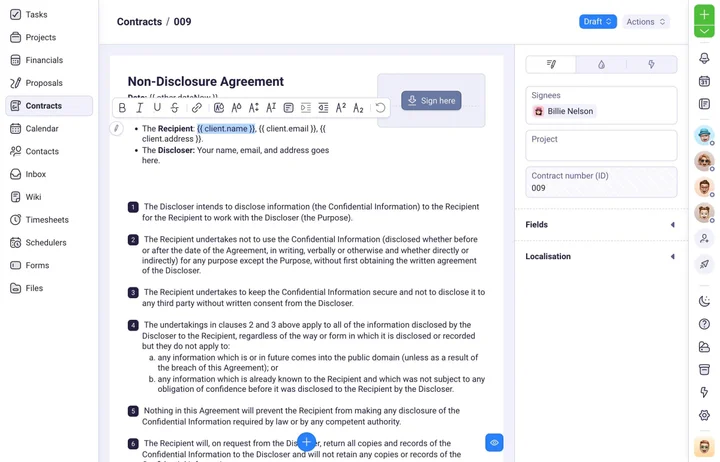
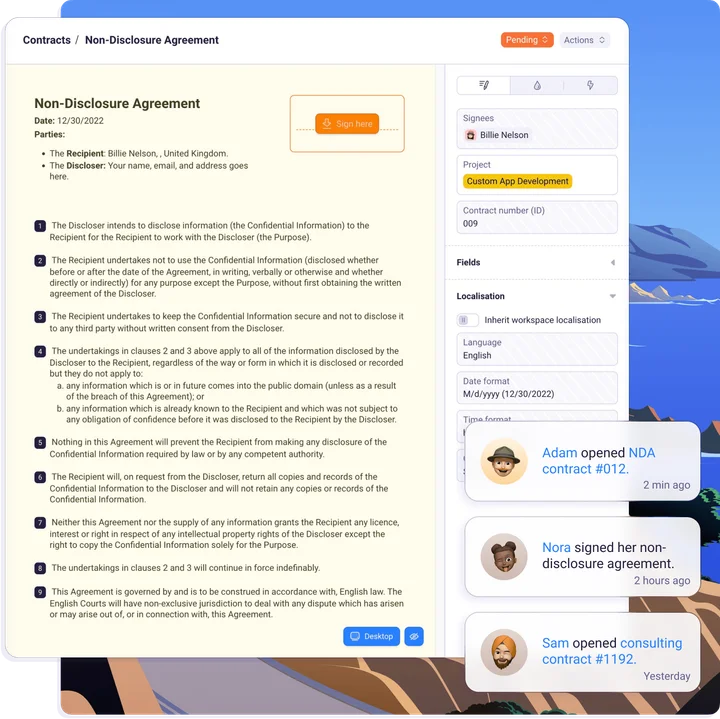
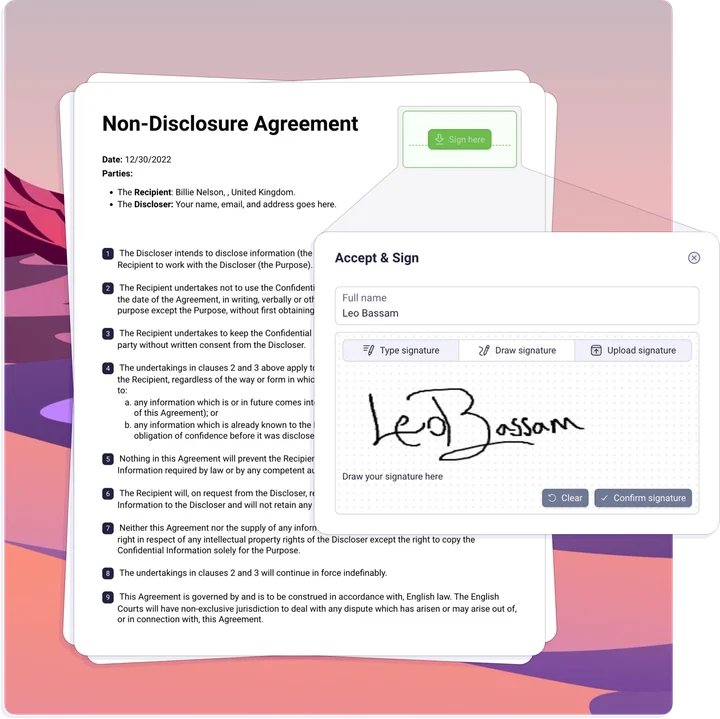
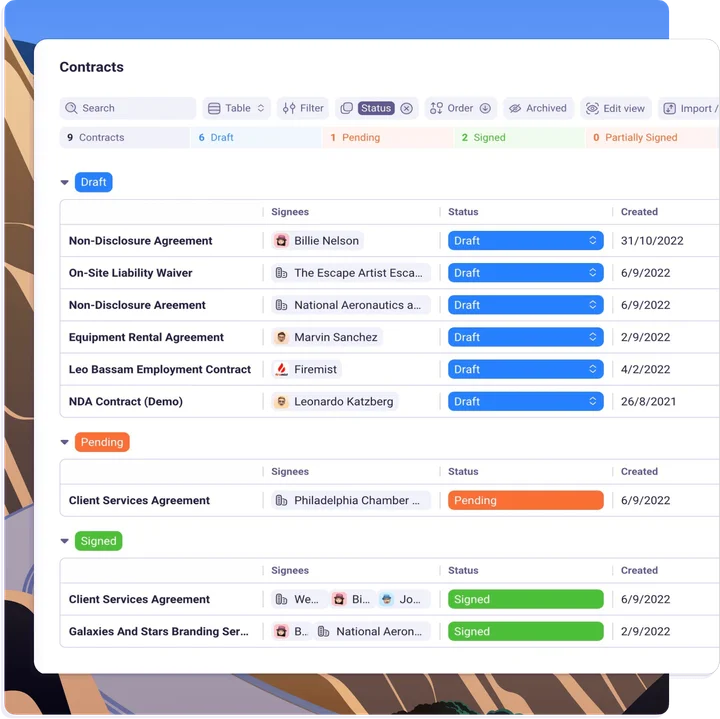
Plutio's contract tools include e-signatures, reusable templates, and a direct link between the signed agreement and the proposal that preceded it. When a proposal gets accepted, the contract terms stay connected to the project timeline and invoice schedule, so the original scope doesn't live in a separate tool from the work. Tracked hours feed into invoice line items, and clients access contracts, project updates, and invoices from a single portal login. Flat pricing at $19/month means sending 3 contracts or 30 doesn't change the monthly bill. The contract generator and NDA generator handle common document types without starting from blank.
- The signed agreement stays visible inside the project through delivery and billing
- E-signatures and reusable templates included at every plan
- Flat-rate pricing ($19/month Core, $49/month Pro) with unlimited contracts
- Clients view and sign contracts from the same portal where projects and invoices live
- No free plan, 14-day trial gives full access to all contract features
- Custom domain for client portal requires Pro ($49/month) or Max ($199/month)
HoneyBook ($16/month, annual billing)
Best for: creative freelancers who combine contracts with proposals and payment requests in a single client document | Capterra: 4.7/5 (390 reviews) | G2: 4.5/5
HoneyBook's Smart Files combine contracts, proposals, and payment requests into one client-facing document, so clients review terms and pay from a single page. The contract layer is part of the document workflow rather than a standalone feature. Project management and time tracking are missing entirely, and as the Plutio vs HoneyBook comparison shows, work that follows the signed contract needs a separate platform. Automation triggers require the Essentials plan at $32/month (annual billing), and a price increase of up to 89% raised costs across all tiers.
- Smart Files combine contracts, proposals, and payment in one client view
- E-signatures included at every tier starting at $16/month (annual)
- Scheduling tools included on Essentials plan ($32/month)
- No project management or time tracking on any plan
- Automation requires Essentials ($32/month), not included on Starter
- Recent price increase of up to 89% across all plans
Bonsai ($9/month, annual billing)
Best for: freelancers who want attorney-reviewed contract templates at the lowest entry price | Capterra: 4.6/5 | G2: 4.3/5
Bonsai includes attorney-reviewed contract templates that cover common freelance agreements (service contracts, NDAs, subcontractor agreements) and take minutes to customize. Proposals, invoicing, and a basic client portal come bundled at every paid tier. The templates handle the legal structure, but the portal has limited branding (no custom domain, no full white-labeling), and per-member pricing on team plans adds cost when collaborators join, which the Plutio vs Bonsai comparison details alongside the portal branding limits.
- Attorney-reviewed contract templates ready to customize and send
- Contracts, proposals, and invoicing bundled at $9/month (annual)
- E-signatures included at every paid tier
- Portal has limited branding (no custom domain, no full white-labeling)
- Per-member pricing on team plans increases cost when scaling
- Payment processing delays reported by multiple Capterra reviewers
Moxie ($12/month)
Best for: freelancers who need CRM and invoicing first, with contracts included on the Starter plan | Trustpilot: 4.8/5 (520 reviews)
Moxie (formerly Hectic) includes CRM, invoicing, proposals, and contracts on the Starter plan at $12/month. The client portal unlocks at the Pro tier ($25/month), where clients can review deliverables and download files under the freelancer's brand. Contracts are part of the workflow but don't link to project timelines the way all-in-one platforms connect scope to delivery. Flat-rate pricing at every tier keeps costs predictable. Most user reviews live on Trustpilot and AppSumo rather than G2 or Capterra, which the Plutio vs Moxie comparison covers alongside the Teams plan's 5-member cap.
- Contracts, CRM, invoicing, and proposals included at $12/month
- Flat-rate pricing at every tier
- E-signatures included on Starter plan
- Client portal requires Pro plan ($25/month), not included on Starter
- Teams plan caps at 5 members
- Limited G2 and Capterra presence for review verification
All four platforms include e-signatures and billing alongside contracts, but only Plutio carries a project from signed agreement through delivery to paid invoice in one workspace. HoneyBook combines documents into Smart Files but has no project tracking after signing. Bonsai bundles attorney-reviewed templates at $9/month but limits portal branding. Moxie includes contracts at $12/month but locks the client portal behind a $25/month upgrade.
Dedicated contract and e-signature tools
Dedicated contract and e-signature tools focus on the signing workflow without bundling invoicing, project management, or client portals. The narrower scope means fewer features to configure, but gaps in billing and project tracking still require separate tools to fill.
DocuSign ($10/month Personal, annual billing)
Best for: freelancers who need an industry-standard e-signature tool for signing documents created elsewhere | Capterra: 4.7/5 (9,000+ reviews) | G2: 4.5/5 (2,500+ reviews)
DocuSign is the most recognized e-signature platform, with the highest review count on this list. The Personal plan at $10/month (annual) includes 5 envelopes per month for a single user, which handles low-volume signing. The Standard plan at $25/user/month adds templates, team features, and higher envelope limits. But DocuSign handles signing, not contract creation. Freelancers draft the contract elsewhere and use DocuSign to collect the signature. Auto-renewal complaints and pricing confusion appear frequently in Capterra reviews, and there's no invoicing, time tracking, or project management on any plan.
- Industry-standard e-signature recognition across clients and agencies
- Personal plan at $10/month (annual) covers low-volume freelancers
- 9,000+ Capterra reviews with a 4.7/5 average rating
- Personal plan limited to 5 envelopes per month, 1 user
- No contract creation, templates only on Standard ($25/user/month)
- No invoicing, no project management, no time tracking
PandaDoc ($19/user/month, annual billing)
Best for: freelancers who need document creation with analytics and a free e-signature option | Capterra: 4.5/5 | G2: 4.7/5
PandaDoc's free plan includes unlimited document creation and e-signatures, which gives it the highest free signing volume on this list. The Starter plan at $19/user/month adds templates, document analytics (open tracking, time spent per section), and custom branding. Analytics show which sections clients spend time on, which helps freelancers identify where clients hesitate before signing. But PandaDoc is a document tool, not a business management platform. Billing, project tracking, and scope management all require separate apps, so the signed contract doesn't connect to the work that follows.
- Free plan includes unlimited document creation and e-signatures
- Document analytics show client engagement (opens, time per section)
- Templates and custom branding on Starter ($19/user/month)
- Per-user pricing adds cost for any additional team members
- No invoicing, no time tracking, no project management
- Analytics and templates require the paid Starter plan
Dropbox Sign ($15/user/month, annual billing)
Best for: freelancers already using Dropbox who want e-signatures within the same ecosystem | Capterra: 4.6/5
Dropbox Sign (formerly HelloSign) offers a free plan with 3 documents per month and paid plans starting at $15/user/month (Essentials). The Standard plan at $25/user/month adds team features, templates, and bulk sending. The signing interface loads a single-page view for recipients. But multiple Capterra reviewers report poor customer support response times, and the per-user pricing model charges for every team member regardless of usage. Contract creation, invoicing, and project management all live outside the tool on any plan.
- Free plan includes 3 documents per month
- Clean signing interface that recipients navigate without confusion
- Integrates with Dropbox for file storage alongside signed contracts
- Poor customer support reported on multiple Capterra reviews
- Per-user pricing charges for every team member
- Contract creation, invoicing, and project tracking require separate subscriptions
Signaturely ($10/month flat)
Best for: freelancers who need unlimited e-signatures at a flat monthly rate without per-envelope limits | Capterra: 4.8/5
Signaturely's Personal plan at $10/month includes unlimited document sends, custom branding, and audit trails. The free plan allows 1 document per month. Flat-rate pricing means sending 5 contracts or 50 costs the same, which avoids the per-envelope cap of tools like DocuSign. Audit trails track every action on the document for legal documentation, but Signaturely handles signatures only, so the contract itself has to be drafted in a separate app before uploading. There are no contract templates, no document builder, no invoicing, and no project tools.
- Unlimited document sends at $10/month flat (no per-envelope fees)
- Custom branding and audit trails included on Personal plan
- Highest Capterra rating on this list (4.8/5)
- No contract templates or document builder
- Everything after the signature needs a different tool
- Free plan limited to 1 document per month
Dedicated signing tools handle the signature step well, but none connect the signed contract to what happens next. DocuSign requires contract creation elsewhere. PandaDoc tracks engagement but doesn't manage projects. Dropbox Sign fits Dropbox users but charges per seat. Signaturely offers unlimited sends at $10/month but has no templates. All four require separate apps for invoicing, project tracking, and scope management after the contract is signed.
Feature comparison at a glance
All 8 tools compared on pricing, e-signatures, contract templates, what happens after signing, and whether invoicing comes bundled.
| Tool | Price (solo) | E-signatures | Contract templates | After signing | Invoicing |
|---|---|---|---|---|---|
| Plutio | $19/mo flat | Unlimited | Included | Links to projects + invoices | Included |
| HoneyBook | $16/mo (annual) | Unlimited | Included | Smart Files only (no PM) | Included |
| Bonsai | $9/mo (annual) | Unlimited | Attorney-reviewed | Basic portal | Included |
| Moxie | $12/mo | Included | Included | Portal at $25/mo | Included |
| DocuSign | $10/mo (annual) | 5/month | Standard plan only | None | No |
| PandaDoc | Free / $19/user/mo | Unlimited (free) | Starter plan only | Analytics only | No |
| Dropbox Sign | Free / $15/user/mo | 3/month (free) | Standard plan only | None | No |
| Signaturely | $10/mo flat | Unlimited | No | None | No |
Plutio is the only tool on this list where contracts, proposals, projects, time tracking, and invoicing all live in one workspace at $19/month. Bonsai matches on templates and pricing but drops off on branding and portal depth. Every dedicated signing tool requires at least two additional apps to handle billing and project tracking after the contract is signed.
Picking the right freelance contract software
The right contract tool depends less on the signing step and more on what the freelancer needs to happen after the contract is signed. A standalone signing tool covers the e-signature step but leaves project tracking, billing, and scope management to other apps.
If contracts need to connect to projects and invoicing
Plutio bundles contracts with proposals, project management, time tracking, and invoicing at $19/month. The signed contract stays attached to the work scope and travels through to the final payment, so terms agreed at kickoff remain visible through delivery. Moxie includes contracts and invoicing at $12/month but locks the client portal behind the $25/month Pro plan, a path the freelance contracts guide maps out alongside which clauses matter most.
If attorney-reviewed templates are the priority
Bonsai's attorney-reviewed templates at $9/month (annual billing) cover service agreements, NDAs, and subcontractor contracts with ready-to-customize language. Plutio includes templates for common contract types and connects them to proposals, but Bonsai's library is more specialized. For freelancers who draft contracts frequently, templates reduce the time from blank page to signed document from hours to minutes.
If budget is the main constraint
PandaDoc's free plan includes unlimited e-signatures and document creation, making it the cheapest entry point for signing. Signaturely offers unlimited sends at $10/month flat. DocuSign's Personal plan starts at $10/month but caps at 5 envelopes. Bonsai starts at $9/month with contracts, proposals, and invoicing bundled. A standalone signing tool ($10/month) plus separate invoicing ($17/month) plus a project tool ($10/month) often costs more than Plutio ($19/month) which includes all three.
If e-signatures are the only need
DocuSign appears in more enterprise workflows than any other signing tool on this list, so many recipients have seen the interface before, but it handles signatures only, with no contract creation or project features. PandaDoc offers free unlimited signatures with document analytics on the paid plan. Dropbox Sign integrates with Dropbox for file storage. Signaturely charges $10/month flat for unlimited sends. None of these tools create contracts, manage projects, or send invoices, so each one handles one step in a workflow that requires additional apps for everything else.
Freelancers who send contracts regularly and need the signed terms to carry through to project milestones and invoice schedules get the most value from platforms where the contract, the project, and the invoice live under a single login rather than three separate tools.
Common contract software mistakes freelancers make
The most common contract mistake is treating the signature as the end of the process instead of the beginning. A signed contract has the most value when the terms stay visible throughout the project, not when the PDF gets filed away after signing.
Using a signing tool without templates
DocuSign and Dropbox Sign handle signatures but don't include contract creation on entry plans, so freelancers draft the agreement in a separate app (Google Docs, Word, a PDF editor) and then upload it for signing. Every manual step between drafting and signing is a place where standard clauses get missed, terms get inconsistent, and the contract takes longer to prepare. Templates solve the drafting problem by starting with attorney-reviewed language that covers the common terms freelancers need.
Not connecting contracts to scope
A signed contract that sits in a folder disconnected from the project creates a gap between what was agreed and what gets delivered. When scope questions come up mid-project, the freelancer has to dig through files to find the original terms, match them against the current work, and reconcile any differences manually. Platforms that link contracts to project timelines keep the agreed scope visible alongside the active work, so the answer to "is this in scope?" is one click away instead of a folder search.
Paying per envelope when volume varies
DocuSign's Personal plan caps at 5 envelopes per month. A freelancer who onboards 8 clients in a busy month either waits for the next billing cycle or upgrades to the $25/user/month Standard plan for just those extra 3 signatures. Flat-rate tools like Plutio ($19/month) and Signaturely ($10/month) charge the same regardless of how many contracts go out, so busy months don't trigger unexpected costs.
Relying on verbal agreements instead of contracts
Skipping the contract entirely is the most expensive mistake on this list. Verbal agreements have no paper trail when scope disputes happen, and the 9% dispute rate means roughly 1 in 11 projects ends in a claim. A signed contract with clear deliverables, payment terms, revision limits, and termination clauses protects both sides. The cost of contract software is a fraction of a single disputed invoice, and the 62-day average resolution time for contract claims means weeks of unpaid work that a signed agreement could have prevented.