15% OFF ON ANY PLANUse code 15off4everClaim now →15% OFF ON ANY PLANUse code 15off4everClaim now →15% OFF ON ANY PLANUse code 15off4everClaim now →15% OFF ON ANY PLANUse code 15off4everClaim now →15% OFF ON ANY PLANUse code 15off4everClaim now →15% OFF ON ANY PLANUse code 15off4everClaim now →
Templates / Form

Free Client Calls Logger Template

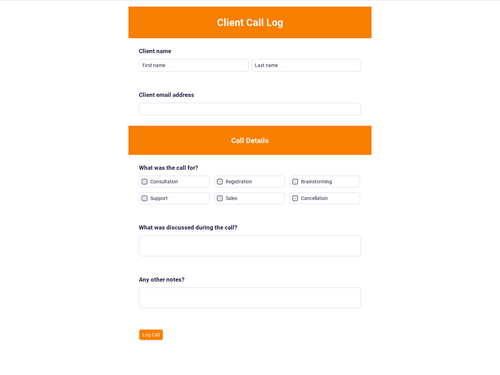
A Client Calls Logger form covers who the call was for, when it happened, what got discussed, the client’s actions, and the next session.

Fenner Coaching - Client Calls Logger template preview

A coaching engagement can turn into a lot of talking, so the client starts wondering if anything will actually change by Monday. The same employee stays difficult, meetings loop, and the manager still needs a way to hold a line without putting on a voice that doesn’t sound like them. The Fenner Coaching Client Calls Logger form gives each session a written record you can drop into a client file, with the facts and next steps in the same place every time.

The form opens with Record this client call, which frames what needs to be captured after a session. Session details then carries the actual log: who the coachee was and their role, when the call started, the topics covered, what the client committed to do, and when the next session is scheduled. The same form also asks for contact details plus a CV upload and an optional link to work, so the record arrives with context attached instead of living in scattered notes.

  • Record this client call Opens the log and prompts the summary: who the session was for, what you covered, client actions, and the next session.
  • Your CV Collects a required file upload alongside the call record, with an optional link field for work samples.
  • Topics covered in this call Captures the discussion in a long-answer field, so the session doesn’t get reduced to a one-line note.
  • Client commitments and actions Records what the client agreed to do next, in their own words, so follow-through stays visible.
  • Next session scheduled (date and time) Logs what’s booked next, with the date and time in the same record as the call notes.

Once the form is in your workspace, you share the link and collect the answers and files in Plutio, so nothing else has to be connected. The submission gives you a consistent call log you can refer back to across leadership development work, founder coaching, or sales coaching.

We went from spending hours on every proposal to creating fully customized ones in under 5 minutes. That's not an exaggeration - we timed it.

Yazan & Mawaheb
Yazan & MawahebAgency Owners

What this form contains

1) Record this client call

The Record this client call section explains what the log is for and what gets recorded from each session.

2) Your name

3) Email address

4) Phone number

5) Your CV

6) Somewhere we can see your work

7) Session details

The Session details section collects the coachee name and role, call start time, topics covered, client commitments, and the next session date and time.

8) Coachee name and role

9) Call start: date and time

10) Topics covered in this call

11) Client commitments and actions

12) Next session scheduled (date and time)

Who it is for

Leadership coaches and founder coaches who want a consistent record of each client session and the next steps that came out of it.

Language:

en

Category:

Last updated:

September 2026

Share template

Questions about this form template

What should a coaching call log include?

A coaching call log usually includes who the session was for, when it happened, what topics got covered, what actions the client committed to, and what’s scheduled next. This form collects those details in the Session details fields.

How do you track client commitments after a coaching session?

A call log works best when it captures commitments as their own field instead of burying them in notes. This template includes a dedicated “Client commitments and actions” question, so the next session can start from what was agreed.

Do you need to log the date and time of coaching sessions?

Session timing matters when you’re looking back at patterns or checking what happened between two calls. The form includes fields for “Call start: date and time” and “Next session scheduled (date and time)” to keep that timeline clear.

Can a coaching call log collect files too?

Some coaching workflows need a document attached to the record, not just text. This form includes a required “Your CV” file upload and an optional link field for “Somewhere we can see your work.”

Where do form responses go after someone submits them?

Responses get collected in Plutio, so the log and any uploaded file land together without needing another tool. That gives you a single submission record for each call.

How do you keep coaching session notes consistent across clients?

Consistency comes from asking the same questions in the same order after every call. This form keeps that structure by collecting the coachee details, topics, commitments, and next session scheduling every time.

Start free today

Your entire business, one login away

No credit card required. No contracts. Just the tools you need to run, grow, and automate your business with Super Work AI.

No credit card required

Plutio - Your entire business, one login away